Multitenant Systems - Part II - Building multitenant backend APIs using Django

This is a continuation of part I of the multitenant series. You can check part 1 here. In this one, I will discuss how we can build the backend of our app using the third architecture discussed in the part I.
What are we building?
An online shop app! This will be a multitenant app where a user can create their own online shop and add users and products to this shop. There can exist any number of shops in our app.
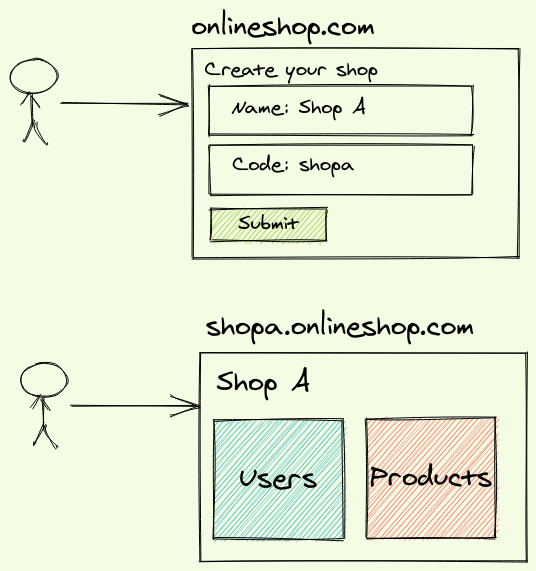
A user can create a new shop and visit their shop using the shop code as the subdomain. Let's build the backend APIs for this system using the Django REST Framework.
Expected APIs
- Create a shop
- Create a user in this shop
- Create a product in this shop
- List the products in this shop
Database Design
We will have a table Tenant to store all the shops. All the other tables will have a reference to the Tenant table.
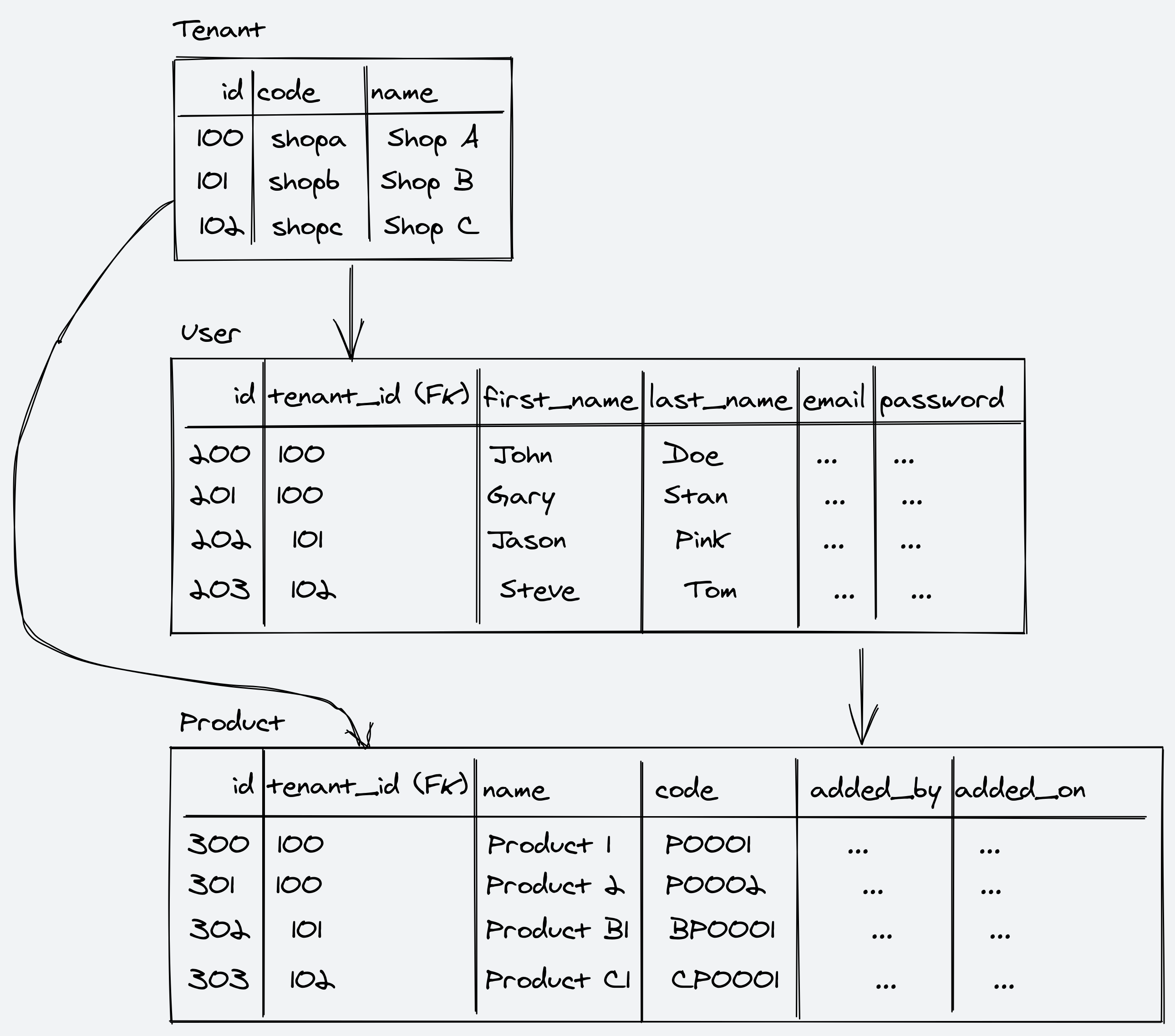
Our Django Models
import uuid
from django.db import models
from django.contrib.auth.models import AbstractBaseUser

from .managers.tenant import TenantManager
from .managers.user import CustomUserManager


class Tenant(models.Model):

    id = models.UUIDField(primary_key=True, default=uuid.uuid4, editable=False)
    name = models.CharField(max_length=128)
    code = models.CharField(max_length=128, unique=True)


class TenantBaseModel(models.Model):

    class Meta:
        abstract = True

    objects = TenantManager()
    id = models.UUIDField(primary_key=True, default=uuid.uuid4, editable=False)
    tenant = models.ForeignKey(Tenant, on_delete=models.CASCADE)


class User(AbstractBaseUser, TenantBaseModel):

    USERNAME_FIELD = 'id'
    REQUIRED_FIELDS = list()

    user_objects = CustomUserManager()
    first_name = models.CharField(max_length=512)
    last_name = models.CharField(max_length=512, null=True, blank=True)
    email = models.EmailField(max_length=512)

    class Meta:
        unique_together = ('tenant_id', 'email',)


class Product(TenantBaseModel):

    name = models.CharField(max_length=256)
    code = models.CharField(max_length=256)
    added_by = models.ForeignKey(User, on_delete=models.CASCADE)
    added_on = models.DateTimeField(auto_now_add=True)
TheTenant model on the top stores all the shop information.
The TenantBaseModel is an abstract class that can be inherited from all our tenant models like User and Product so they automatically get the tenant fields.
We have overridden the objects in the TenantBaseModel with the TenantManager which we will see next.
The TenantManager
from django.db import models


class TenantManager(models.Manager):

    def get_queryset(self):
        return None

    def t_filter(self, tenant, **kwargs):
        return super(TenantManager, self) \
            .get_queryset() \
            .filter(tenant=tenant, **kwargs)
We override the get_queryset to return None.
So, AnyTenantModel.objects.all() or AnyTenantModel.objects.filter() will return None.
We can use t_filter to get the single tenant related information, AnyTenantModel.objects.t_filter(tenant=tenant).
Tenant Routing Middleware
Every tenant-based API should have a tenant code passed. We can pass the tenant code via the API headers. This middleware will pick the tenant code from the headers, get the tenant object from the DB, and set the tenant in the request object.
from django.http import Http404
from django.urls import reverse

from ..models import Tenant

TENANT_URLS = [
    reverse('tenants-list')
]

class CustomTenantMiddleware:

    def __init__(self, get_response):
        self.get_response = get_response
        self.TENANT_NOT_FOUND_EXCEPTION = Http404

    def __call__(self, request):
        code = request.META.get('HTTP_TENANT_CODE')
        if request.path in TENANT_URLS:
            return self.get_response(request)
        try:
            tenant = Tenant.objects.get(code=code)
            request.tenant = tenant
            return self.get_response(request)
        except Exception:
            raise self.TENANT_NOT_FOUND_EXCEPTION(
                f'Tenant with code \'{code}\' does not exists'
            )
Handling authentication
Once the JWT token authentication is done, we also check if this authenticated user is a part of this tenant.
from rest_framework import exceptions
from knox.auth import TokenAuthentication
from ..models import User


class CustomTokenAuthentication(TokenAuthentication):

    def authenticate(self, request):
        user, auth_token = super().authenticate(request)

        if user.tenant != request.tenant:
            raise exceptions.AuthenticationFailed(
                'User does not exist in this tenant')

        return user, auth_token
Tenant based viewsets
Once we have completed all the above steps, we can easily integrate all this together. Our authentication class will be the CustomTokenAuthentication class, we can set it globally in the settings file as well.
We override get_queryset to use t_filter and we get the tenant in the request object. So User.objects.t_filter(tenant=self.request.tenant) means all the users in this tenant.
from rest_framework import viewsets
from ..serializers.user import UserSerializer
from ..models import User
from ..authentication.auth import CustomTokenAuthentication


class UserViewSet(viewsets.ModelViewSet):

    serializer_class = UserSerializer
    authentication_classes = (CustomTokenAuthentication, )
    pagination_class = None

    def get_queryset(self):
        return User.objects \
            .t_filter(tenant=self.request.tenant) \
            .order_by('first_name')
from rest_framework import viewsets
from ..models import Product
from ..serializers.product import ProductSerializer
from ..authentication.auth import CustomTokenAuthentication


class ProductViewSet(viewsets.ModelViewSet):

    serializer_class = ProductSerializer
    authentication_classes = (CustomTokenAuthentication, )
    pagination_class = None

    def get_queryset(self):
        return Product.objects \
            .t_filter(tenant=self.request.tenant) \
            .order_by('code')
Tada! You have your multitenant backend APIs ready. Check out the full code here.
Thanks for reading!
Comments
Join the discussionNo comments yet. Be the first to comment.