Maximizing API Efficiency: Empowering API Consumers to Choose Their Data Fields

Imagine you've got a REST API for listing users, and each user's information shows up in 12 fields.
GET /v1/users/?page=1&page_size=15
{
    "pagination_data": {
        "total_records": 10000,
        "pages": 667,
        "prev_page_no": null,
        "next_page_no": 2
    },
    "data": [
        {
            "id": 9643,
            "uid": "a0e0de85-8948-4912-96df-b98faba87e15",
            "first_name": "John",
            "last_name": "Doe",
            "username": "john.doe",
            "email": "john.doe@email.com",
            "avatar": "https://robohash.org/doloribusquiaofficia.png?size=300x300&set=set1",
            "gender": "male",
            "phone_number": "+290 671.941.6123 x503",
            "social_insurance_number": "760764373",
            "date_of_birth": "1967-03-10",
            "subscription_plan": "Silver",
        },
        ...
    ]
}
The consumers of this API can use its data in various ways, often needing only a few specific fields.
For example, when populating a user drop down, consumers usually require only the ID, first name, and last name.
So, we don't always need to respond with all the fields.
Using query parameters to select
We can use a query parameter called select where consumers can input the specific fields they need, separated by commas.
GET /v1/users/?page=1&page_size=12&select=uid,first_name,email
This would get only the id, uid, first_name, and the email fields.
{
    "pagination_data": {
        "total_records": 10000,
        "pages": 667,
        "prev_page_no": null,
        "next_page_no": 2
    },
    "data": [
        {
            "id": 9643,
            "uid": "a0e0de85-8948-4912-96df-b98faba87e15",
            "first_name": "John",
            "email": "john.doe@email.com"
        },
        ...
    ]
}
GET /v1/users/?page=1&page_size=12&select=first_name,avatar
This would get only the id, first_name and the avatar fields.
{
    "pagination_data": {
        "total_records": 10000,
        "pages": 667,
        "prev_page_no": null,
        "next_page_no": 2
    },
    "data": [
        {
            "id": 9643,
            "first_name": "John",
            "avatar": "https://robohash.org/doloribusquiaofficia.png?size=300x300&set=set1",
        },
        ...
    ]
}
The User Listing API Setup
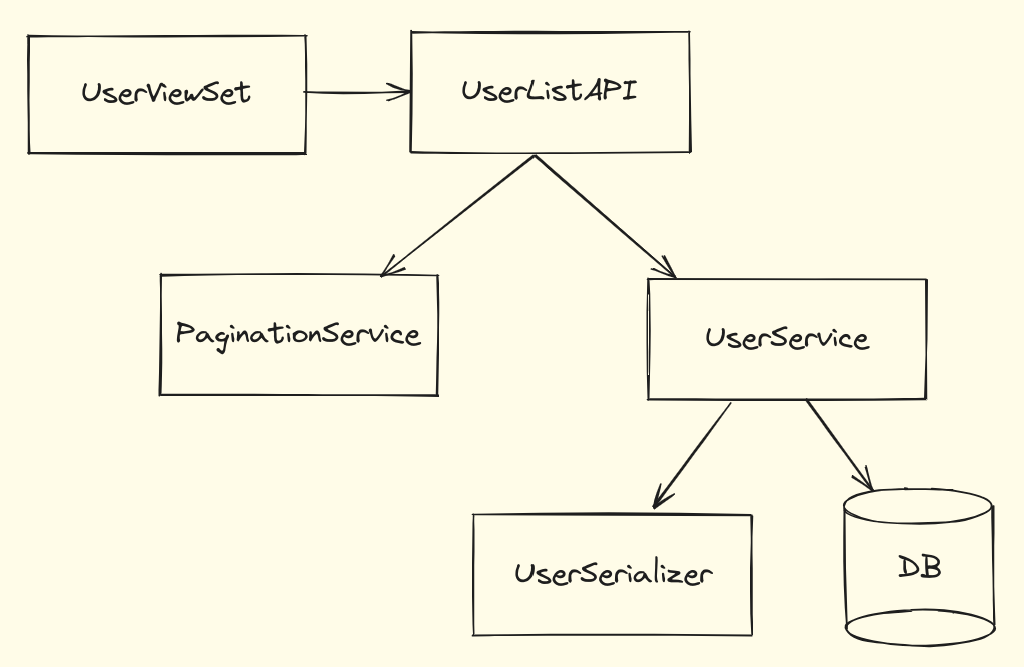
The
UserViewSetclass relies on theUserListAPIclass, which handles the listing logic.Within the
UserListAPI:Pagination tasks are managed using the
PaginationServiceclass.User data tasks are handled by the
UserService.Data retrieval from the database is done, with data then serialized through the
UserSerializerclass.
API without the 'select' feature
The UserViewSet
The UserViewSet's list method instantiates the UserListAPI by sending the request object's query parameter and then triggers the process method.
It encapsulates this data within a Response object with a status of 200.
from rest_framework import status, viewsets, mixins
from .user_list_api import UserListAPI


class UserViewSet(mixins.ListModelMixin, viewsets.GenericViewSet):

    permission_classes = [IsAuthenticated, UserPermission]

    def list(self, request):
        data = UserListAPI(
            query_params=request.query_params
        ).process()
        return Response(data, status=status.HTTP_200_OK)
The UserListAPI
The UserListAPI serves as a facade class containing the actual logic for listing users, aiding in separating logic from the Viewset class. Here's what it does:
Retrieves all user data using the
UserService'slist_allmethod.Obtains the paginated result set based on the provided page number and size by utilizing the
PaginationService'sget_paginated_querysetmethod.Serializes the paginated data through the
UserService'sserialize_manymethod.Finally, creates the formatted paginated response using the
PaginationService'sget_paginated_formatmethod before returning it.
from typing import Dict
from django.http import QueryDict
from ..pagination import PaginationService
from .user_service import UserService


class UserListAPI:

    def __init__(self, query_params: QueryDict) -> None:
        self._query_params = query_params

    def process(self) -> Dict:
        page_no = PaginationService.parse_page_no(self._query_params)
        page_size = PaginationService.parse_page_size(self._query_params)

        page_service = PaginationService(
            page_no=page_no,
            page_size=page_size
        )

        user_service = UserService()

        users = user_service.list_all()

        paginated_users = page_service.get_paginated_queryset(
            qs=users)

        users = user_service.serialize_many(
            users=paginated_users
        )

        users = page_service.get_paginated_format(qs=users)
        return users
The UserService
The UserService class comprises two methods:
list_all: Retrieves all users from the database.serialize_many: Serializes the provided users using theUserSerializerclass.
from django.db.models.query import QuerySet
from typing import List
from .models import User

class UserService:

    def list_all(self) -> QuerySet:
        return User.objects.all()

    def serialize_many(self, users) -> List:
        return UserSerializer(users, many=True).data
The UserSerializer
The UserSerializer class extends the ModelSerializer and includes all 12 fields from the User model.
from rest_framework import serializers
from .models import User

class UserSerializer(serializers.ModelSerializer):

    class Meta:
        model = User
        fields = [
            'id',
            'uid',
            'first_name',
            'last_name',
            'username',
            'email',
            'avatar',
            'gender',
            'phone_number',
            'social_insurance_number',
            'date_of_birth',
            'subscription_plan',
        ]
Now, if we call the below API:
GET /v1/users/?page=1&page_size=15
The SQL query will select all fields from the database.
SELECT
  "user"."id",
  "user"."uid",
  "user"."first_name",
  "user"."last_name",
  "user"."username",
  "user"."email",
  "user"."avatar",
  "user"."gender",
  "user"."phone_number",
  "user"."social_insurance_number",
  "user"."date_of_birth",
  "user"."subscription_plan"
FROM "user"
LIMIT 12
Adding the 'select' query param feature
Step 1: Filtering select fields from the UserSerializer
Make the UserSerializer to remove specific fields based on the selected fields.
In the
UserSerializerconstructor, pass theselect_fieldsstring in thecontextdictionary.Modify the
fieldslist in theMetaclass by excluding any field names not found inselect_fields. See the_filter_select_fieldsmethod for reference.
from rest_framework import serializers
from .models import User

class UserSerializer(serializers.ModelSerializer):

    def __init__(self, *args, **kwargs):
        super(self.__class__, self).__init__(*args, **kwargs)
        context = kwargs.get('context', {})
        select_fields: str = context.get('select_fields', '')
        self._filter_select_fields(select_fields=select_fields)

    def _filter_select_fields(self, select_fields: str) -> None:
        if select_fields:
            existing: set = set(self.fields)
            allowed: set = set(map(str.strip, select_fields.split(',')))
            allowed = {'id'}.union(allowed)

            for field_name in existing - allowed:
                self.fields.pop(field_name)

    class Meta:
        model = User
        fields = [
            'id',
            'uid',
            'first_name',
            'last_name',
            'username',
            'email',
            'avatar',
            'gender',
            'phone_number',
            'social_insurance_number',
            'date_of_birth',
            'subscription_plan',
        ]
Step 2: Pass select_fields in the serialize_many method of the UserService
from django.db.models.query import QuerySet
from typing import List
from .models import User


class UserService:
    ...

    def serialize_many(
        self,
        users,
        select_fields: Optional[str] = None,
    ) -> List:
        return UserSerializer(users, many=True, context={
            'select_fields': select_fields,
        }).data
Step 3: Handle select_fields in the list_all method of the UserService
Turns the selected_fields, which are in a comma-separated string, into a list of strings.
It then uses the Django's only method to pick particular fields from the database.
from django.db.models.query import QuerySet
from typing import List
from .models import User


class UserService:

    def _get_only_fields(self, select_fields: str) -> List[str]:
        return list(map(str.strip, select_fields.split(',')))

    def list_all(
        self, select_fields: Optional[str] = None
    ) -> QuerySet:
        users_query = User.objects

        if select_fields:
            only_fields = self._get_only_fields(select_fields)
            users_query = users_query.only(*only_fields)

        return users_query.all()

    ...
Step 4: Pass select_fields to the UserService methods
Pass the select_fields comma separated string to the list_all and the serialize_many method of the UserService class.
from typing import Dict
from django.http import QueryDict
from ..pagination import PaginationService
from .user_service import UserService

QUERY_PARAM_SELECT = 'select'


class UserListAPI:

    def __init__(self, query_params: QueryDict) -> None:
        self._query_params = query_params

    def process(self) -> Dict:
        page_no = PaginationService.parse_page_no(self._query_params)
        page_size = PaginationService.parse_page_size(self._query_params)

        page_service = PaginationService(
            page_no=page_no,
            page_size=page_size
        )

        user_service = UserService()
        select_fields = self.query_params.get(QUERY_PARAM_SELECT)

        users = user_service.list_all(select_fields=select_fields)

        paginated_users = page_service.get_paginated_queryset(
            qs=users)

        users = user_service.serialize_many(
            users=paginated_users,
            select_fields=select_fields,
        )

        users = page_service.get_paginated_format(qs=users)
        return users
Now, if we call the below API with the select query parameter:
GET /v1/users/?page=1&page_size=12&select=uid,first_name,email
The SQL query will select only 4 fields from the database.
SELECT
  "user"."id",
  "user"."uid",
  "user"."first_name",
  "user"."email"
FROM "user"
LIMIT 12
Enabling consumers to choose what they need can significantly enhance API performance.
This will notably boost database query speed. Adding caching on top of this could make it even better.
I hope you found this helpful. Thanks for reading!
Comments
Join the discussionYour blogs are helpful..Thanks for sharing your knowledge 😁👍🏼