# Let's build a flashcards-based learning app!
Ever since I have entered the tech industry, I constantly update myself with new technologies, concepts, etc. They might be courses, or articles or some principles, or any best patterns that one should follow. I also dive into other stuff which is not tech-related to help me in other areas of life. We are living in a time where there is an abundance of data and knowledge. This is great and we are lucky but the problem we tend to forget what we learned. All of us have faced this, right? We read, listen or learn so many things but how much of it can we remember? The forgetting curve can explain this.
### The forgetting curve
The [forgetting curve](https://en.wikipedia.org/wiki/Forgetting_curve) is a concept discovered by the German psychologist [Hermann Ebbinghaus](https://en.wikipedia.org/wiki/Hermann_Ebbinghaus) which hypothesizes the decline of memory retention in time. It basically says that humans tend to forget their newly learned knowledge in a matter of days or weeks unless they consciously review the learned material.
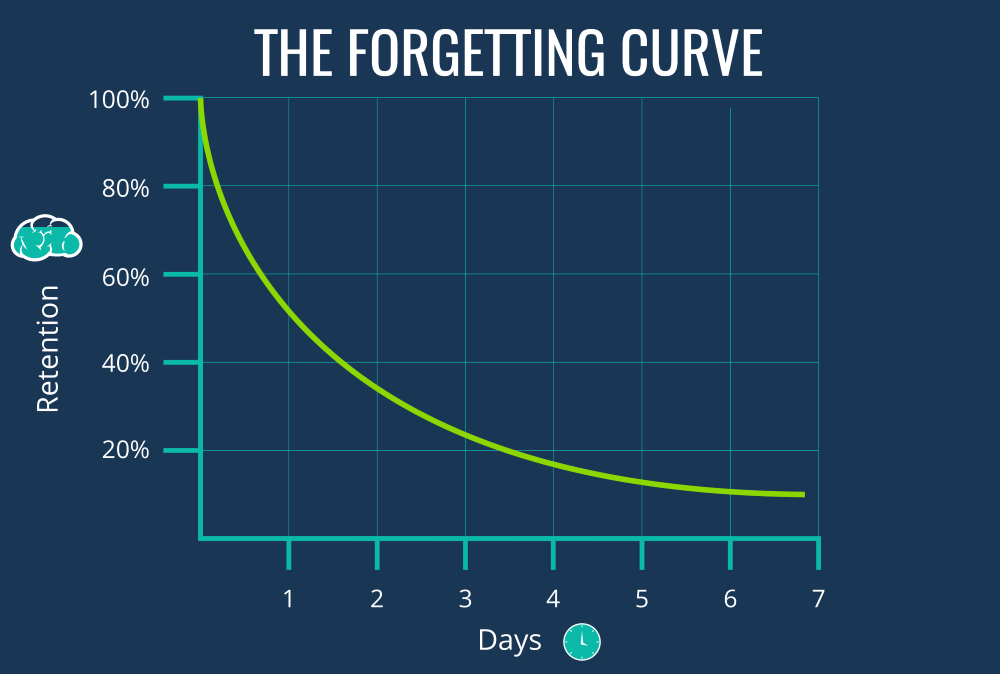
Okay, so our memory retention decreases as time passes. So how to tackle this?
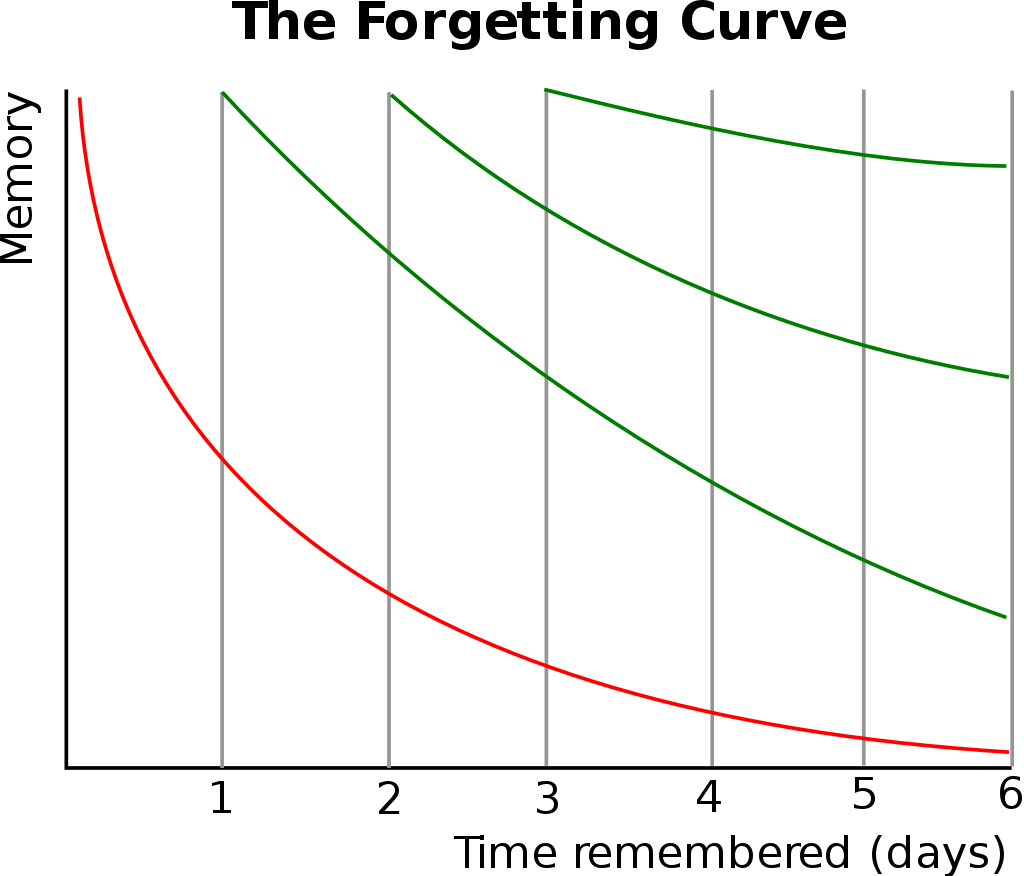
One of the techniques hypothesized by Hermann to improve the strength of memory was something called spaced repetition.
His premise was that each repetition in learning increases the optimum interval before the next repetition is needed (for near-perfect retention, initial repetitions may need to be made within days, but later they can be made after years). He discovered that information is easier to recall when it's built upon things you already know, and the forgetting curve was flattened by every repetition.
### The Leitner system
The [Leitner system](https://en.wikipedia.org/wiki/Leitner_system) is a widely used method of efficiently using flashcards that was proposed by the German science journalist Sebastian Leitner in the 1970s. It is a simple implementation of the principle of spaced repetition, where cards are reviewed at increasing intervals.
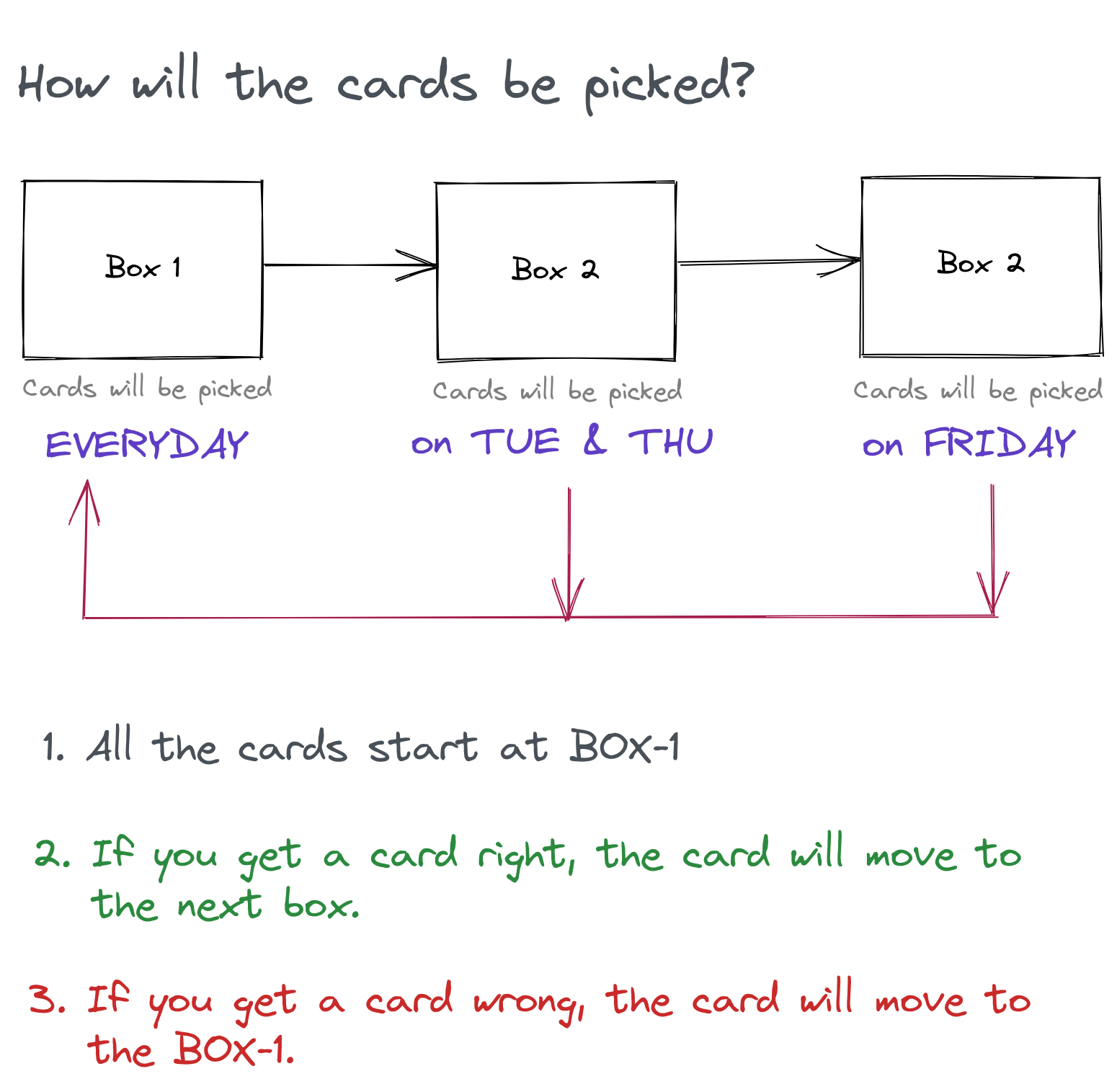
We will be implementing a version of the Leitner system as shown below with three boxes. We create a deck of flashcards for a topic that we are learning. All the cards start in the first box. We pick cards one by one, if we can remember the contents of the card, it goes to the next box. If we cannot remember then it goes directly to the first box.
## The stack
We will be using [HarperDB](https://harperdb.io/) as our database.
The frontend will be built using [Vue.js](https://vuejs.org/), [Tailwind CSS](https://tailwindcss.com/) for styling, and [Buefy](https://buefy.org/) for some components and the backend APIs will be built using [FastAPI](https://fastapi.tiangolo.com/).
## Building the app
The features of the app will be as follows:
- The user can create an account and log in to the system.
- The user can create a deck.
- The user can add flashcards to a deck.
- The user can create a revision session for a deck. In a session, the set of cards will be displayed one by one with respect to the day and the boxes allowed for the day.
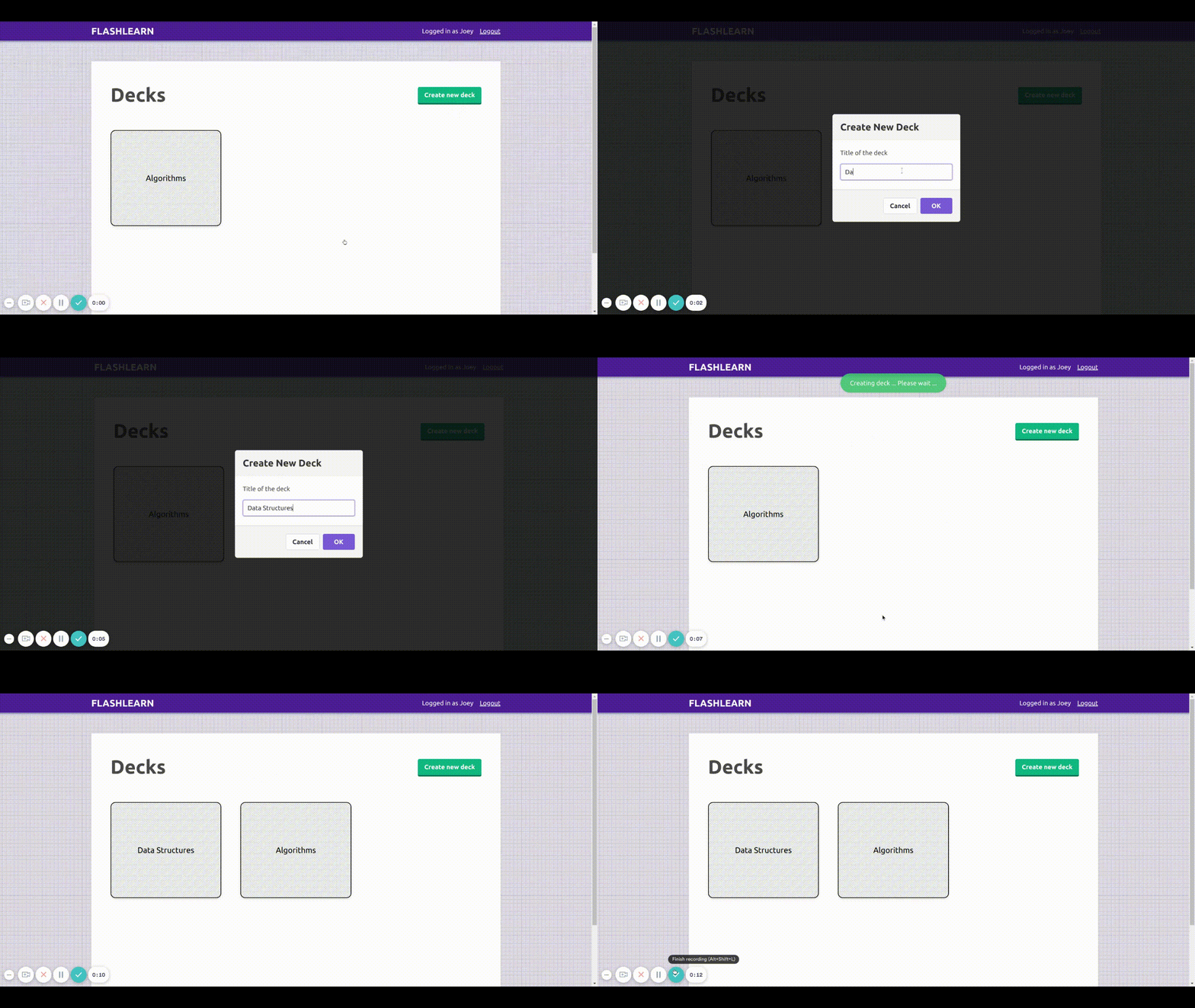
The first primary feature of the app is creating a deck. You can think of a deck as a topic you want to learn, for example, Algorithms, Web Development, React, etc. As soon as the user logs in to the app, the decks created by the user will be displayed. The user can click the `Create new deck` button to create a new deck, plus the user can create as many decks as they want.
Once a deck is created, the next thing to be done is to add cards to the deck, for example, An Algorithms deck can have cards like Insertion Sort, Quick Sort, Binary Search, etc. The user can click on the deck and they will be redirected to the deck's page. Here in the `Cards` tab, the user can use the `Add new card to this deck` button to add a new card. The user will be prompted to add a title and the content for the card. The user can add any number of cards to a deck.
%[https://vimeo.com/569227915/?title=false&controls=false]
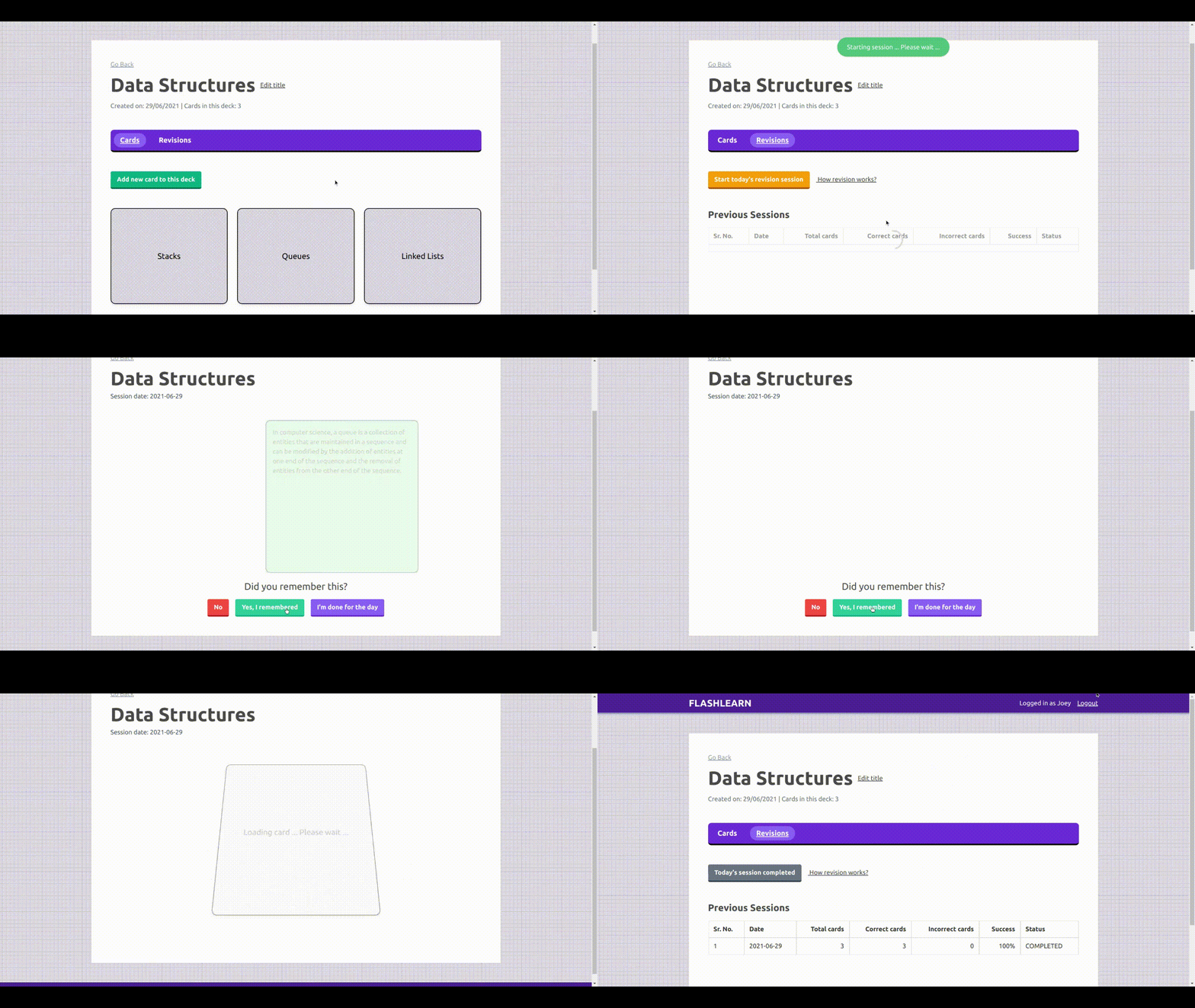
Next comes the interesting section of the app called Revisions. On the deck page, the user can click the `Revisions` tab to view all the previous session's logs. On the top, there is a button called `Start today's revision session` which creates a new session for the day.
In a session, the cards from the deck will be displayed one by one to the user, then the user can try and recall and flip the card to see the contents of the cards. If they recalled correctly then they can click `Yes` else `No`. Once all cards are viewed, the session will be completed and the user can go back and see that the current session was recorded.
## Future Improvements
- **Email reminder**: An email can be sent to the user to remind them to complete their session for the day.
- **Combined session**: Currently, the user has to go to each deck and complete their session for the day. A combined session can be a session where all the cards from all the decks for today can be loaded, so in one session multiple deck revisions can be completed.
- **Markdown support**: Markdown support for card contents.
## Code & Deployment
Check out the [frontend code here](https://github.com/akshays94/flashcardsapp_client) and [backend code here](https://github.com/akshays94/flashcardsapp_server)
The APIs are deployed on [Heroku](https://www.heroku.com/) and the frontend Vue.js app on [Vercel](https://vercel.com/).
🍇 [Click here to try the app](https://flashcardsapp-client.vercel.app) 🍇
## To conclude
This was my first time participating in a hackathon and it was absolute fun. The [HarperDB Cloud](https://harperdb.io/product/harperdb-cloud/) and the [HarperDB Python SDK](https://github.com/harperdb/harperdb-sdk-python) was a breeze to use. I hope you liked the app.
Thanks for reading!
📷 Cover photo by Tim Mossholder on Unsplash