# Dynamic Components in Vue.js

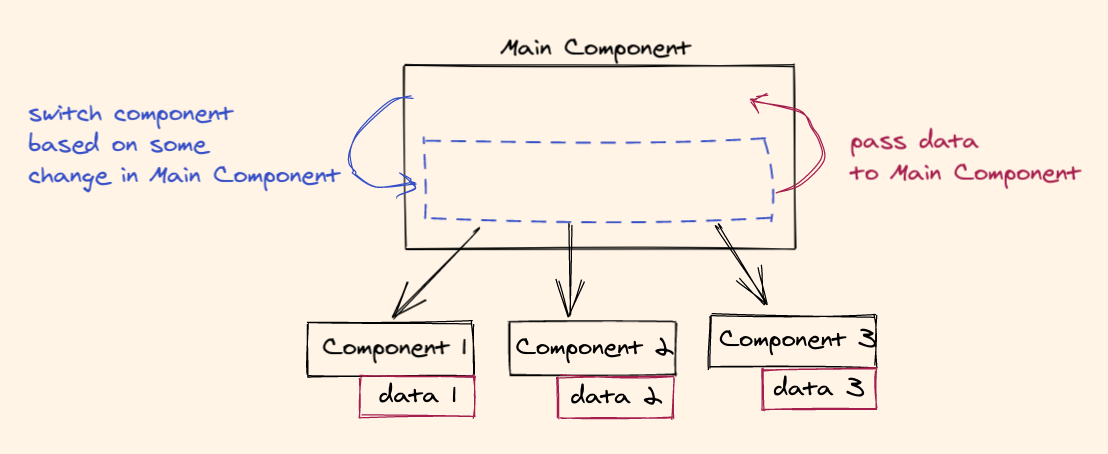
A lot of time while building your UI, you may have to switch your child components based on some value. Let's say you have a form for adding a question. You will also have a dropdown field to select the type of your question. If you select type as `Multiple Choice`, you may have a different set of configurations or you select `Checkboxes`, you may have a completely different set of configurations.

The aim is the efficiently switch between the child components and get back the data from the selected child component.
![dynamic component illustration](https://cdn.hashnode.com/res/hashnode/image/upload/v1618733711751/CQBtUWb0_.png)

### Let's build

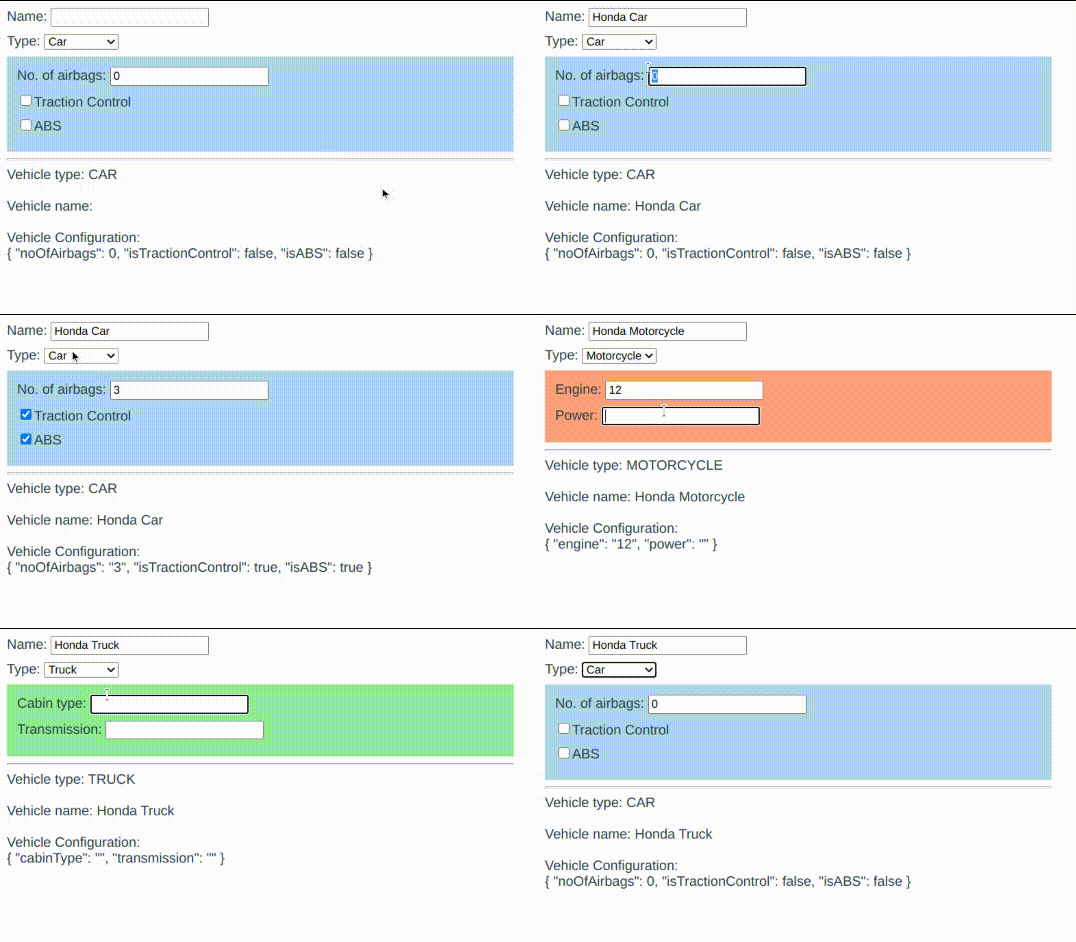
We will be building an `Add new vehicle` form where `Name` and `Type` are a part of the main component. 

Based on the type selected we switch the configuration form (child component) of the selected vehicle type. Finally, whatever configuration is added, should be passed back to the main form.

This is what it would look like.
![DEMO GIF](https://cdn.hashnode.com/res/hashnode/image/upload/v1618923524723/55W3MLixA.gif)

The project structure is given below. We will use `App.vue` as the main component and `Car, Motorcycle, Truck` as the switchable child components.

```
// project structure
- src/
    - components/
        - Car.vue
        - Motorcycle.vue
        - Truck.vue
    - App.vue
    ...
``` 

#### Initial setup

In the App.vue, we create data to store the name, vehicle type, and vehicle configuration.

```
// App.vue
// =========
<script>
export default {
  name: 'App',

  data() {
    return {
      name: '',
      vehicleType: 'CAR',
      vehicleConfig: {}
    }
  }
}
</script>
```

And then we bind `name` to the input text field and the `vehicleType` to the select field using `v-model`. At the bottom, after the `hr` tag, we display all the data.

```
// App.vue
// =========
<template>
  <div id="app">
    <div>
      <label>Name: </label>
      <input type="text" v-model="name">
    </div>

    <div>
      <label>Type: </label>
      <select v-model="vehicleType">
        <option value="CAR">Car</option>
        <option value="MOTORCYCLE">Motorcycle</option>
        <option value="TRUCK">Truck</option>
      </select>
    </div>

    <hr>

    <div>
      Vehicle type: {{ vehicleType }}
      <br><br>
      Vehicle name: {{ name }}
      <br><br>
      Vehicle Configuration: <br>
      {{ vehicleConfig }}
    </div>
  </div>
</template>
```

#### Switching child components

Once we import all the child components, we add a computed property `selectedVehicleComponent` which will return the component name based on the selected `vehicleType` .

```
// App.vue
// =========
<script>
import Car from '@/components/Car.vue'
import Motorcycle from '@/components/Motorcycle.vue'
import Truck from '@/components/Truck.vue'

export default {
  name: 'App',

  components: {
    Car,
    Motorcycle,
    Truck,
  },

  data() {
    return {
      name: '',
      vehicleType: 'CAR',
      vehicleConfig: {}
    }
  },

  computed: {
    selectedVehicleComponent() {
      switch(this.vehicleType) {
        case 'CAR':
          return 'Car'
        case 'MOTORCYCLE':
          return 'Motorcycle'
        case 'TRUCK':
          return 'Truck'       
      }
      return null
    }
  }
}
</script>
```

Using the `<component>` tag and binding the `selectedVehicleComponent` property to the `is` attribute, we create the switchable component.

```
// App.vue
// =========
<template>
  <div id="app">
    <div>
      <label>Name: </label>
      <input type="text" v-model="name">
    </div>

    <div>
      <label>Type: </label>
      <select v-model="vehicleType">
        <option value="CAR">Car</option>
        <option value="MOTORCYCLE">Motorcycle</option>
        <option value="TRUCK">Truck</option>
      </select>
    </div>

    <component
      :is="selectedVehicleComponent"
    />

    <hr>

    <div>
      Vehicle type: {{ vehicleType }}
      <br><br>
      Vehicle name: {{ name }}
      <br><br>
      Vehicle Configuration: <br>
      {{ vehicleConfig }}
    </div>
  </div>
</template>
```

Now, if you change the type of the vehicle to `Motorcycle`, the `Motorcycle` component will be loaded, if you change the type to `Truck`, its component will be rendered, and so on.

#### Passing data from the child to the parent

Let's look at the `Car` component.

```
// components/Car.vue
// ==================
<template>
  <div class="container">
    <div>
      <label>No. of airbags: </label>
      <input type="text" v-model="noOfAirbags" />
    </div>

    <div>
      <input type="checkbox" v-model="isTractionControl" />
      <label>Traction Control</label>
    </div>

    <div>
      <input type="checkbox" v-model="isABS" />
      <label>ABS</label>
    </div>
  </div>
</template>

<script>
export default {
  name: 'Car',
  data() {
    return {
      noOfAirbags: 0,
      isTractionControl: false,
      isABS: false
    }
  },

  created() {
    this.emitCarConfig()
  },

  methods: {
    emitCarConfig() {
      this.$emit('on-change-car-config', {
        noOfAirbags: this.noOfAirbags,
        isTractionControl: this.isTractionControl,
        isABS: this.isABS,
      })
    }
  },

  watch: {
    noOfAirbags() { this.emitCarConfig() },
    isTractionControl() { this.emitCarConfig() },
    isABS() { this.emitCarConfig() }
  }
}
</script>
```

1.  The data has 3 values: `noOfAirbags`, `isTractionControl` and `isABS`. We have bound these values to their corresponding input fields using `v-model`.
2. We create a method `emitCarConfig()` that emits an event with the event name `on-change-car-config` and passes the data as a payload.
3. We call `emitCarConfig()` in the `created` method so whenever the component is switched we pass the data to the parent.
4. We create watchers to watch all the values of the data, so whenever they change we call `emitCarConfig()` and pass the data to the parent.

That's it for the child component. 

Now, the parent has to listen to this event `on-change-car-config`.

```
// App.vue
// =========
<template>
  <div id="app">
    ...

    <component
      :is="selectedVehicleComponent"
      @on-change-car-config="onChangeCarConfig"
    />

    ...
  </div>
</template>

<script>
...

export default {
  ...

  methods: {
    onChangeCarConfig(carConfig) {
      this.vehicleConfig = carConfig
    }
  }
}
</script>
```

When `on-change-car-config` event is fired, we call the `onChangeCarConfig()` method where we save the new `carConfig` (passed from the car component) to `vehicleConfig` in our parent.

Similarly, we can create `Motorcycle.vue` and `Truck.vue`, and listen to its events.

```
// App.vue
// =========
<template>
  <div id="app">
    ...

    <component
      :is="selectedVehicleComponent"
      @on-change-car-config="onChangeCarConfig"
      @on-change-motorcycle-config="onChangeMotorcycleConfig"
      @on-change-truck-config="onChangeTruckConfig"
    />

    ...
  </div>
</template>
``` 

Finally, `App.vue` should look like this.

```
// App.vue
// =========
<template>
  <div id="app">
    <div>
      <label>Name: </label>
      <input type="text" v-model="name">
    </div>

    <div>
      <label>Type: </label>
      <select v-model="vehicleType">
        <option value="CAR">Car</option>
        <option value="MOTORCYCLE">Motorcycle</option>
        <option value="TRUCK">Truck</option>
      </select>
    </div>

    <div>
      <component
        :is="selectedVehicleComponent"
        @on-change-car-config="onChangeCarConfig"
        @on-change-motorcycle-config="onChangeMotorcycleConfig"
        @on-change-truck-config="onChangeTruckConfig"
      />
    </div>

    <hr>

    <div>
      Vehicle type: {{ vehicleType }}
      <br><br>
      Vehicle name: {{ name }}
      <br><br>
      Vehicle Configuration: <br>
      {{ vehicleConfig }}
    </div>
  </div>
</template>

<script>
import Car from '@/components/Car.vue'
import Motorcycle from '@/components/Motorcycle.vue'
import Truck from '@/components/Truck.vue'

export default {
  name: 'App',

  components: {
    Car,
    Motorcycle,
    Truck,
  },

  data() {
    return {
      name: '',
      vehicleType: 'CAR',
      vehicleConfig: {}
    }
  },

  computed: {
    selectedVehicleComponent() {
      switch(this.vehicleType) {
        case 'CAR':
          return 'Car'
        case 'MOTORCYCLE':
          return 'Motorcycle'
        case 'TRUCK':
          return 'Truck'       
      }
      return null
    }
  },

  methods: {
    onChangeCarConfig(carConfig) {
      this.vehicleConfig = carConfig
    },

    onChangeMotorcycleConfig(motorcycleConfig) {
      this.vehicleConfig = motorcycleConfig
    },

    onChangeTruckConfig(truckConfig) {
      this.vehicleConfig = truckConfig
    }
  }
}
</script>
```

That's it, we have successfully wired everything up. [Click here to check out the full code](https://github.com/akshays94/dynamic-components-demo) 

Thanks for reading!
